Warren County ARES
WCKY ARES - Kentucky District 3 Warren County
Field Operations Manual - Revised 2026.09.01
Downloads
1.0 Introduction
We as members of The Kentucky District 3 Warren County ARES strive to be an effective partner in emergency/disaster response, providing the citizens and public service/safety partners with communications expertise, situational awareness and capabilities of professional communicators. We will accomplish this mission by utilizing our equipment, expertise, skills and capabilities as Amateur Radio Operators to effectively pass message traffic, provide accurate and detailed situation reports, and be active during field exercises. We strive to be supportive in times of need in our local communities and beyond.
Remember: Secure your family and your home first. Do not respond until they are safe and well provided for.
2.0 Table of Contents
3.0 Purpose
The purpose of this document is to document operating procedures and best practices for WCKY ARES operation. This document will serve as an instruction book in both general and specific operating procedures.
4.0 Scope
The listed operations and procedures are only applicable to the WCKY ARES group and not necessarily those of any other Region, Section, or Division of ARES or of any particular other agency, though nothing in this document excludes them to being used for those purposes. If provided specific operating guidelines or procedures from Served Agencies, this document will be updated to use them.
Absence of a procedure does not preclude its use for ARES operations, especially if it is specific to a Served Agency. Use your skills and judgement as a communicator to incorporate those procedures into your workflow during an activation, and teach others those procedures as time and/or conditions allow.
5.0 Definitions and Acronyms
- EC - Emergency Coordinator
- AEC - Assistant Emergency Coordinator, appointed by EC
- LACO - Local ARES Communications Officer, usually the EC, who is the ultimate decision maker for all emergency communications operations for the local ARES group
- NCS - Net Control Station
- EMA - Emergency Management Agency
- EOC - Emergency Operations Center
- NVIS - Near Vertical Incident Skywave, an HF antenna closer to the ground than $\lambda$/2 to the ground, especially good for regional communication or hilly terrain
- ICS - Incident Command Structure
- ICS Form 205 - Incident Radio Communications Plan - provides information on all radio frequency or trunked radio system talkgroup assignments for each operational period.
- ICS Form 213 - Standard FEMA form to document messages between incident personnel or distant locations
- ICS Form 214 - Activity Log - records details of notable activities at any ICS level, including single resources, equipment, Task Forces, etc.
6.0 Operations
6.0.0 Activations
DO NOT SELF ACTIVATE!
Self activation causes confusion, potential safety issues, and does not follow proper chain of authority. ARES serves agencies; we do not lead them. Check your gear, kits, etc., and wait for activation information from your EC.
In the event that a severe disturbance is forecasted for our area (i.e. Tornado, Ice, Flooding, etc.), you are encouraged to monitor the Primary Repeater frequency in the event that issues escalate quickly
6.0.1 Level 1 Warning
Phone Tree
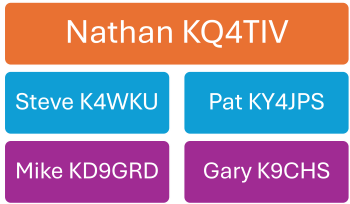
If EMA or another served agency contacts the EC for a Level 1 Warning, we will follow the below prescription:
- EC will start using the phone tree by contacting the first two members
- The EC will give instructions to the members called
- If you receive a call, reference the phone tree for members you need to call
- Relay the same information exactly as given by the previous member who called you
- If the EC instructions are to begin a net, go to the Primary Repeater frequency
- Upon arrival, first listen for a few moments to gauge if there is any current traffic
- If there is no traffic, call for Net Control
- Once Net Control acknowledges your traffic state:
- “Net Control, this is
checking in, MONITOR", or - “Net Control, this is
, unable to assist at this time” then follow with either MONITOR, CLEAR, CLOSE depending on your scenario - You will be acknowledged by Net Control, then monitor any traffic if you are able
Level 2 Alert
If this is a Level 2 Alert, perform the same prescription as for Level 1, but you need to ready your equipment, kits, family, vehicles, and supplies. At this point, activation is extremely likely. The Net needs to be monitored for important information.
Level 3 Activation
A Level 3 Activation will be communicated on the initial phone call. You need to grab your equipment and go-kit and start moving towards either the Primary or Secondary rally point, whichever is communicated by the EC. In your vehicle it is advised to have a mobile radio on, monitoring the Primary Repeater frequency. If you do not hear any traffic after 5 minutes, go to the Primary Simplex frequency.
Upon arrival, first listen for a few moments to gauge if there is any current traffic
- If there is no traffic, call for Net Control
- Once Net Control acknowledges your traffic state:
- “Net Control, this is
checking in, MONITOR", or - “Net Control, this is
, unable to assist at this time” then follow with either MONITOR, CLEAR, CLOSE depending on your situation and abilities.
- “Net Control, this is
The EC may meet you at the Rally Point, or they may need to travel to the EOC, depending on agency needs. Wait at the Rally Point as long as it is safe until you receive assignments or further information from the EC.
6.1.0 Basic Emergency Communication Practices
- Listen before transmitting.
- Use standard ITU phonetics.
- Use 24-hour time format.
- Accuracy is the first priority, rather than speed.
- Be clear and concise by not using unnecessary words.
- Talk across the FACE of the microphone.
- Transmit messages exactly.
- Always transmit FACTS rather than hearsay.
- Stay alert — take breaks when needed.
- Always know your location.
- Avoid using Q-signals or 10-codes in voice transmissions.
- Speak slowly and clearly, with little emotion in your voice.
- Use tactical call signs whenever possible.
- No wisecracks or jokes on an emergency net.
- Never transmit the names of injured or deceased individuals over a voice channel.
- Read every message before transmitting it. If you have questions about what is being communicated, get clarification from the originating party.
- A good message will never require the recipient to ask for additional information.
6.1.1 Controlled Net Participation Guidelines
- LISTEN, LISTEN, LISTEN. Remain silent unless you are called on or have information for the net.
- Check in using your call sign. Use your call suffix or your assigned tactical call to get the attention of Net Control.
- The Net Control station is “in charge” of all transmissions. Permission of the Net Control station is required to make any contact. Ask Net Control before contacting any station directly.
- Use the term “BREAK” to interrupt an existing conversation only if you have emergency traffic that must be passed immediately. Otherwise, just say your call sign and the Net Control station will recognize you as soon as possible.
- Plan your message and keep it brief. Organize your thoughts or write down your message before transmitting. Give only the FACTS; do not “editorialize.”
- Always acknowledge calls or instructions.
- Use clear vocabulary and standard ITU phonetics. Do not use Q-signals.
- Receive permission before leaving the net. Make sure you check out with Net Control.
6.1.2 Proword Dictionary for Emergency Communications
- AFFIRMATIVE means “Yes” or “I agree” or “Permission granted.”
- BREAK, BREAK, BREAK means you have emergency traffic that must be passed immediately.
- CHECK BREAK means you are pausing to verify that the receiving station has copied your message. An appropriate response from the receiving station would be “COPY.”
- CLEAR or OUT means your transmission is completed and no answer is required or expected.
- CLOSE means you are shutting down your station and can no longer be contacted.
- COPY THAT or ROGER means you have received the transmission satisfactorily.
- CORRECT means you acknowledge what was transmitted as correct.
- CORRECTION means an error has been made and the transmission will continue with the last word correctly transmitted.
- DECIMAL indicates a decimal point.
- DISREGARD means an error has been made in the transmission that is in progress and you are to completely ignore this transmission.
- FIGURES means that the following words are to be copied as numbers.
- I SPELL means you will spell the following word(s) phonetically.
- NEGATIVE means “No” or “I disagree” or “Permission denied.”
- OUT or CLEAR means your transmission is completed and no answer is required or expected.
- OVER means you are finished with your transmission and the other station is expected to reply.
- ROGER or COPY THAT means you have received the transmission satisfactorily.
- SAY AGAIN means you want the last message to be repeated. You may include a modifier to have part of a message repeated, as in the following examples:
- “Say again ALL AFTER ____”
- “Say again ALL BEFORE _____”
- “Say again WORD AFTER _____”
- “Say again WORD BEFORE ____”
- STANDBY or WAIT means you are not yet ready to copy. You may include a time modifier, such as “Standby one.”
- THIS IS means the transmission is from the station whose call sign follows.
6.2.0 Assignments
Assignments will be provided by the EC. Stations will be assigned two operators wherever possible to provide setup support and relief for rest. However, if resources are spread thin, we could assign one operator to some stations.
6.2.1 Assignments - General
6.2.2 Assignments - Shelters
6.2.3 Assignments - Search and Rescue
| Version | Date | Author | Notes |
|---|---|---|---|
| 1.0 | 2026.09.01 | KQ4TIV Nathan Butts | Initial creation |